

I have been playing with custom built agents for a while, mostly for learning purposes, that work with small local LLMs (typically 7b to 35b). But recently I decided to give a change to a bigger open-source agent that opens a bigger range of possibilities and doesn’t involve me developing every tool I need, so I looked into Hermes Agent.
One of the first things I read was about the 64k recommended context and some people on Reddit saying that, now a days, just saying a simple hello on the chat window would eat a big chunk of that context window. My guess was context bloat from skills, tools and MCPs, so I decided to test it an understand a little bit better how the default context works on Hermes.
Why is this a problem?
When playing with local LLMs this can be a problem for two main reasons.
First, most of the times you are trying to squeeze the biggest models you can in your VRAM and that can leave less space for context (event with KV Cache quantized).
Second, even if you have space for large context windows, this is where small LLMs start to trip themselves and are unable to perform well over a long context (not event talking about the performance degrading as the context grows).
So to keep things flowing smooth with this kinds of models, we need to keep the context lean.
How my test was structured
I did a fresh install of Hermes, v0.16.0 (2026.6.5), and:
- Started a chat with a simple
hellowith all the default skills, tools and MCPs enabled. - Then disabled everything and sent the same
hello. - Finally, enabled only what I felt I would need for now, based on the tasks I want to execute, and tried
helloagain.
On all of those tests, I looked at what was enabled and the context size after a single message by running /usage after.
Results
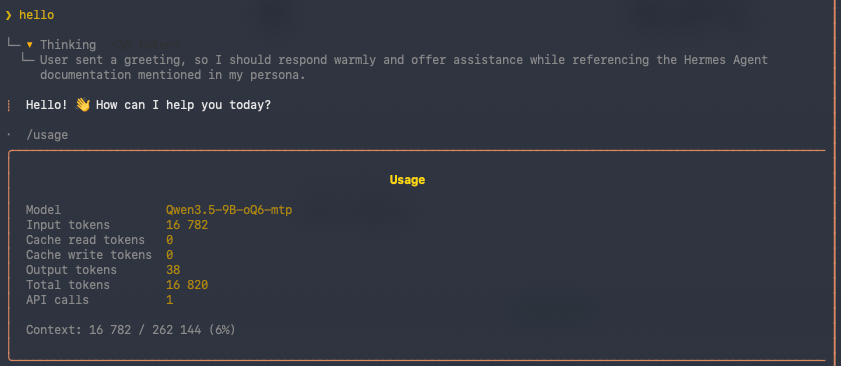
With default skills, tools and MCPs (in this version where 29 tools and 73 skills):
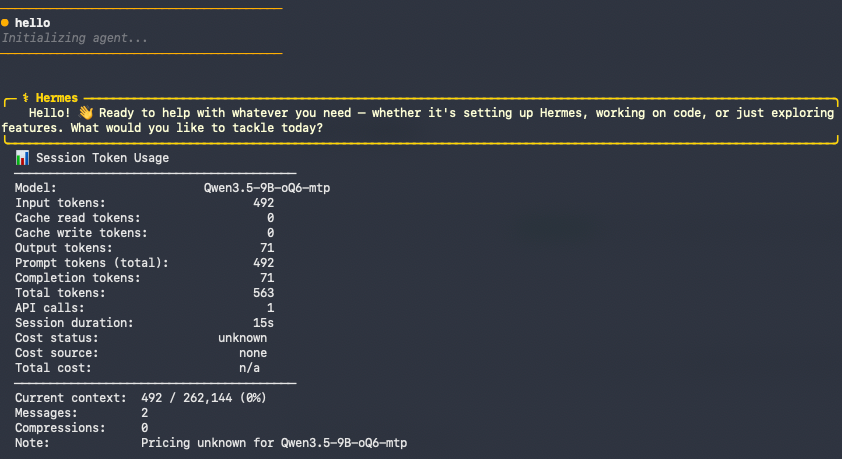
With everything disabled:
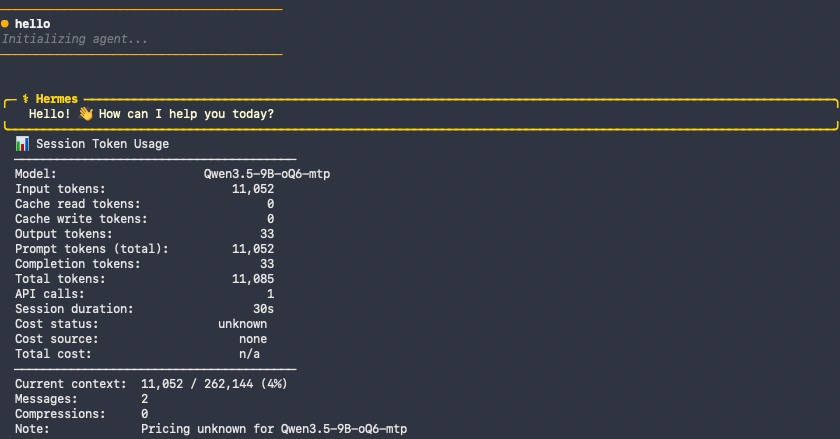
With only a few enabled (13 tools and 14 skills):
Where your context window actually goes
Every single request Hermes sends to your model carries a fixed payload before any of your actual conversation:
- The system prompt — Hermes’ identity plus behavioral guidance. The identity core is small (a few hundred tokens), but the guidance is conditional: Hermes only injects the instructions for tools you’ve actually enabled (memory guidance when the memory tool is on, skills guidance when skills are on, and so on). So this section grows with what you turn on — it is not a fixed floor.
- The skills index — a one-line description of every installed skill. More on this below; it’s cheaper than you’d think.
- Tool schemas — the full JSON definition (name + description + parameter schema) of every enabled tool. This is the big one.
- Then your memory/profile, context files, and finally the conversation itself.
Items 1–3 are the “fixed overhead.” They’re sent on every turn, and on a small model they compete directly with your working space.
Here’s what that overhead looked like on my machine in three scenarios, all just saying hello:
| Scenario | Tools | Skills | Context on hello |
|---|---|---|---|
| Default install (everything on) | 29 | 73 | ~16,800 tokens |
| Everything disabled | 0 | 2 | ~490 tokens |
| Only what I need (curated) | ~13 | ~14 | ~11,000 tokens |
Look at the top and bottom rows. The difference between a default install and a bare one is ~16,300 tokens of fixed overhead — on every request. On a 262K-token window that’s ~6% and you’d never notice. On a 64K model it’s ~26% of your entire context gone before you type a word. That’s the whole story right there.
Skills are lazy — not the root cause here
Here’s the part that surprises people: those 73 skills barely cost anything. Hermes skills use progressive disclosure. Only a short one-line description of each skill sits in the prompt (the “skills index”). The full SKILL.md body — the actual multi-step procedure — is only loaded when a task calls for it, via the agent’s skill_view tool.
On my setup, 14 skills cost about 500 tokens of index; even the full default set of 73 skills is only ~2,200 tokens. So you can install skills without worrying so much. They don’t bloat every request the way tools do, but they can still confuse smaller models when it comes the time you decide what to use.
Tools are eager — this is your real cost
Tools are the opposite of skills. Every enabled tool’s full JSON schema is injected into every request, eagerly, whether you use it that session or not. That’s where your ~16K default overhead actually comes from.
There’s a nuance worth knowing, new in Hermes v0.16: a feature called Tool Search (progressive disclosure for tools). When enabled, it replaces MCP and plugin tools with three small bridge tools — tool_search, tool_describe, tool_call — and surfaces the rest on demand, exactly like skills. In auto mode it kicks in once the deferrable tool schemas would exceed ~10% of your context window.
But here’s the catch that matters: core Hermes tools are never deferred. Tool Search only collapses MCP and non-core plugin tools. So if your bloat is from the built-in toolsets (file, terminal, browser, delegation, etc.) — which it is, for most new users — Tool Search won’t help you. It becomes valuable later, once you start wiring up MCP servers and your tool catalog balloons; those will lazy-load. For the core stuff, your only real lever is not enabling toolsets you don’t need.
But, do all tools cost the same?
One thing that caught my attention was that reducing from 29 tools to 13 only reduced context from ~16800 to ~11000. So I decided to dig deeper intro the footprint of every tool on the context window.
Hermes ships a hermes prompt-size command that reports your fixed prompt budget. It’s useful, but it has two limitations for this purpose: it only gives you the aggregate tool-schema size (not per-tool), and it builds its estimate with all toolsets enabled — it ignores your platform_toolsets config, so it overcounts if you’ve trimmed.
So I wrote a small script that:
- resolves the same enabled toolsets your live session actually uses,
- measures each tool individually (total tokens, plus the description-vs-parameters split),
- rolls the numbers up by toolset (the unit you actually toggle), and
- flags which tools are core (never deferred) vs MCP/plugin (deferrable behind Tool Search).
It runs fully local, and it auto-locates the Python interpreter Hermes is installed under, so you can just run it.
Running it
Check the GitHub repo and run it yourself:
git clone https://github.com/aguyintech/hermes-tool-context-usage.git
cd hermes-tool-budget
./hermes_tool_context_usage.sh

# Options
./hermes_tool_context_usage.sh --all-tools          # measure ALL toolsets (worst case)
./hermes_tool_context_usage.sh --platform telegram  # simulate a platform's toolset
./hermes_tool_context_usage.sh --json # machine-readable outputIf your hermes is a wrapper script and auto-detection can’t find the right Python, run it directly against the venv — the script will print the exact command to use.
Reading the output
Here’s the --all-tools run on my machine — every default toolset enabled — so you can see where the cost concentrates and decide what’s worth it:
Tool-schema budget · platform=cli · ceiling (all credentialed toolsets — like prompt-size)
tokenizer: chars/4 approx · tool_search: enabled=auto, threshold_pct=10.0
29 tools · 12,108 tokens
  of which deferrable (MCP/plugin): 188 tokens — the rest are core, never deferred

By toolset (the unit you toggle with `hermes tools`):
  toolset                tools    tokens      %
  delegation                 1     1,925  15.9%
  terminal                   2     1,711  14.1%
  browser                   10     1,552  12.8%
  file                       4     1,475  12.2%
  skills                     3     1,335  11.0%
  session_search             1     1,249  10.3%
  memory                     1       694   5.7%
  code_execution             1       600   5.0%
  todo                       1       343   2.8%
  clarify                    1       320   2.6%
  image_gen                  1       247   2.0%
  tts                        1       238   2.0%
  vision                     1       231   1.9%
  video                      1       188   1.6%

Top tools by token cost  (D = deferrable behind tool_search):
  tool                      toolset            D   tokens  (desc/params tok)
  delegate_task             delegation         ·    1,925  (776/1,118)
  terminal                  terminal           ·    1,393  (581/783)
  session_search            session_search     ·    1,249  (675/536)
  skill_manage              skills             ·    1,025  (447/552)
  memory                    memory             ·      694  (369/300)
  execute_code              code_execution     ·      600  (508/56)
  patch                     file               ·      482  (121/339)
  search_files              file               ·      446  (109/313)
  todo                      todo               ·      343  (162/158)
  clarify                   clarify            ·      320  (194/102)
  process                   terminal           ·      318  (90/206)
  browser_vision            browser            ·      299  (164/111)
  write_file                file               ·      286  (97/167)
  read_file                 file               ·      261  (130/109)
  browser_console           browser            ·      252  (116/112)
  image_generate            image_gen          ·      247  (120/104)
  text_to_speech            tts                ·      238  (99/115)
  skill_view                skills             ·      233  (90/120)
  vision_analyze            vision             ·      231  (117/91)
  browser_navigate          browser            ·      213  (150/39)
  browser_snapshot          browser            ·      205  (128/53)
  video_analyze             video              D      188  (80/86)
  browser_type              browser            ·      126  (43/60)
  browser_click             browser            ·      117  (53/41)
  browser_scroll            browser            ·      103  (40/39)
  browser_press             browser            ·      100  (37/40)
  browser_get_images        browser            ·       79  (45/9)
  skills_list               skills             ·       77  (22/32)
browser_back browser · 58 (25/9)A few things jump out:
delegationis the single most expensive toolset (1,925 tokens, 16%) — that’s thedelegate_tasktool. It’s incredibly useful for spawning subagents that hold heavy toolsets in isolated context… but if you’re not actually delegating in this session, it’s pure dead weight. For most simple sessions, this is the first thing I cut.session_search(1,249 tokens) is great for cross-session recall, but if your session is self-contained, you don’t need it loaded.- The 10-tool
browsergroup is cheaper than you’d expect (1,552 tokens total —browser_backis only 58). Don’t reflexively kill browser thinking it’s the hog; the cost is concentrated in a few fat individual tools, not the count. fileandskillsearn their keep for almost any real work, and you should keep the skills tools — they’re what make skill progressive-disclosure work in the first place.
The per-tool table (which the script also prints) shows the cost is dominated by long descriptions and parameter schemas on a handful of tools — delegate_task, terminal, session_search, skill_manage. Those you can’t trim without editing source, which is exactly why disabling at the toolset level is the right move.
A note on accuracy: the token counts use the chars/4 rule — the same estimate Hermes itself uses for its Tool Search threshold gate — so they match how Hermes accounts for tool cost. If you want it to use
tiktoken(cl100k) instead,pip install tiktokeninto the Hermes venv and the script will pick it up automatically. Since most of us run non-OpenAI local models anyway, neither is exact for your specific tokenizer, but both are more than good enough to rank tools and make keep/cut decisions.
The fix: start empty, grow on purpose
This is the whole philosophy, and it’s the opposite of what most people do:
Don’t start from the default everything-on config and trim. Start from nothing and add only what your current use case needs. Grow your toolset as you discover real needs, not before.
My own path was: I disabled everything (context dropped to ~490 tokens on a simple hello message), then turned back on only file and skills, plus a couple of others, and landed around ~7,200 tokens of tool schema — roughly half the default. For focused note-taking or coding sessions where I’m not delegating to subagents, I trim further to ~3,700 tokens. Same model, same hardware, dramatically more room to actually work.
You can do this in multiple ways:
# Persistent: opens a per-platform toggle UI (writes to your config)
hermes tools

# One-off lean session, no config changes:
hermes chat --toolsets file,skills,clarify,memory

# Inside Hermes Desktop using the UI
hermes desktopBut before you can decide what to keep, you can check what each tool costs. That’s what the script is for.
A sane starting point
If you’re brand new and running a small local model, here’s the config I’d actually recommend starting from:
- Enable:
file,skills, andclarify. That’s enough for note-taking, light coding, and the agent asking you good questions. Addmemoryif you lean on Hermes’ learning loop. - Add when you need them:
terminalandcode_executionwhen you start doing real shell/coding work;browserwhen you actually need web automation;delegationwhen you have heavy toolsets worth pushing into subagents; MCP servers as you connect real integrations (these lazy-load via Tool Search, so they’re cheaper to keep around). - Don’t sweat skills. Install whatever looks useful. They’re lazy-loaded and don’t tax every request.
- Re-check with the script whenever your context feels heavy, and after adding anything new.
The mindset shift is the whole point: Hermes’ defaults are built to show off everything it can do, not to run lean on a 9B model. Treat the default install as a menu, not a starting plate. Begin empty, add deliberately, and let your toolset grow alongside your actual use cases. Your small model — and your prefill times — will thank you.